Hello and welcome. The step-by-step process
is at the bottom of this blog for those that are desperate to get cracking (I share
you pain!). For anybody else, here’s my story all about how my…….Huawei watch got
stuck in a bootloop and how I stumbled upon a potential fix.
So it began
One morning, I woke up to find my Huawei Watch
1 inexplicably stuck in a bootloop. The Huawei logo would appear, buzz one or
two times, then the Huawei logo would appear, buzz one or two…….
I was immediately googling for a solution and
was recommended that I put the watch on charge through the mains and try a factory
reset. It took hours of holding down the on/off button, waiting for the Huawei logo,
then releasing the button after the first buzz but BEFORE the second buzz. Eventually
I thought I managed to bring up the fastboot menu (see first image below), pressing button repeatedly until 'reboot-recovery' appears, press/hold button until it reboots to recovery menu (see second image), swipe down to factory reset,
and ok it, beating the crashing/bootloop cycle. Thank god!........Until the
next day when it started buzzing like crazy and ended up stuck in a bootloop, Again!

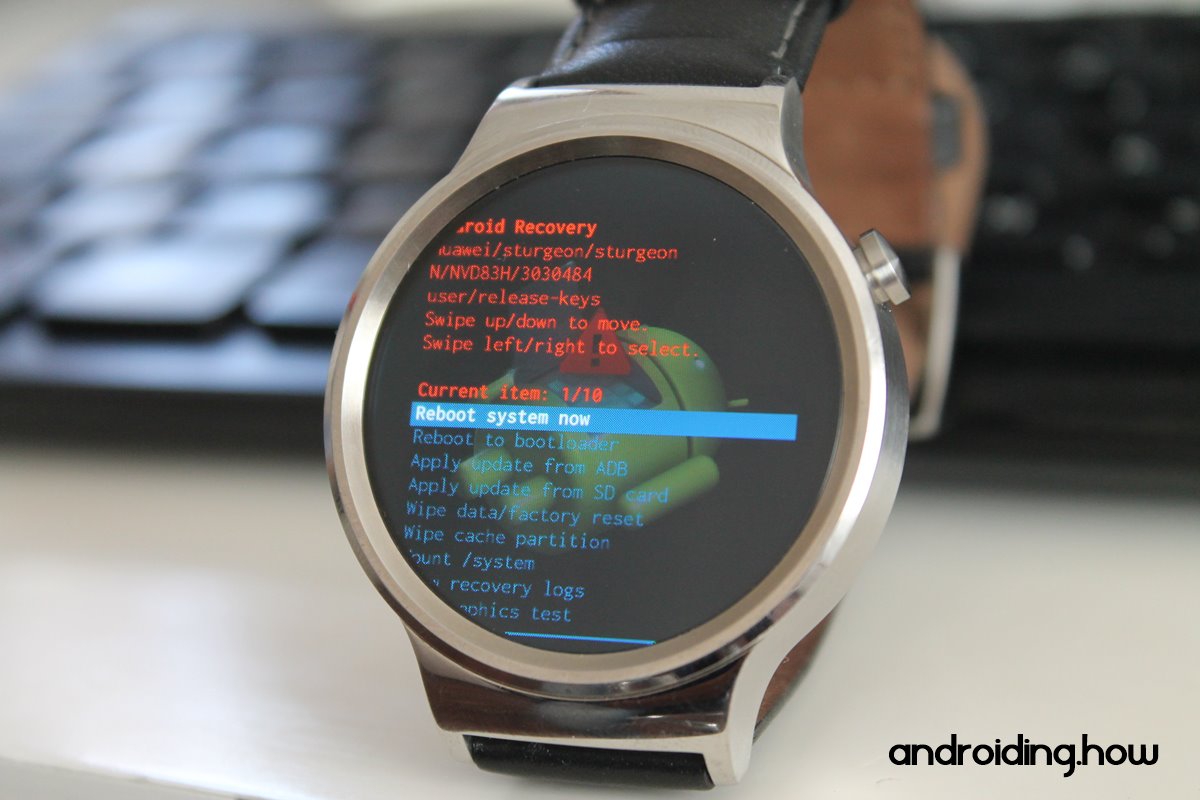
This time I managed to get the fastboot
menu up more-or-less straight away (practice makes perfect, hahahahaha, kill me), factory reset, then
noticed it was back at the recovery menu asking me if I wanted to 'Reboot system now'. (See second image above) Oops! I figured this was the crucial step I was
missing so rebooted the watch and hey presto! The watch was working again.
Until the next day. The watch started buzzing like crazy as, this time, I
noticed Google assistant was constantly trying to activate itself. Crash. Bootloop.
Argh!!!!
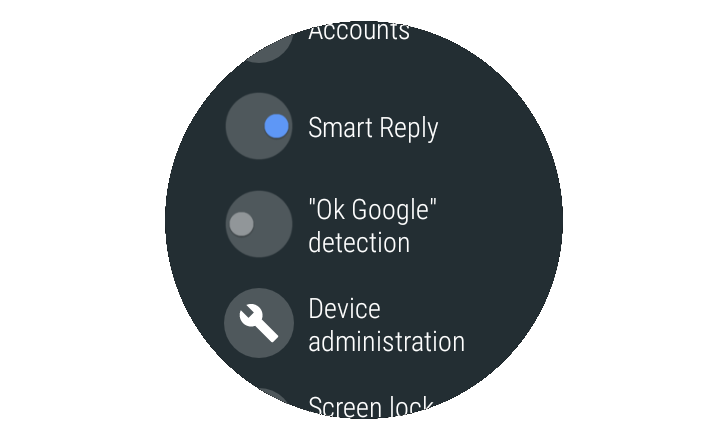
Another google and came across an article about how deactivating ‘OK Google’ detection can make an Android Wear watch run
more smoothly. Last throw of the dice! Factory reset my watch. Went through the
initial setup process then IMMEDIATELY deactivated ‘OK Google’ detection. At the
time of typing this, it’s been almost a week since I did this and my watch hasn’t
crashed once. If anything, the watch is working better than ever with hardly any of the stuttering it suffered before the crashing/bootloop issue. I’ve even, tentatively, used google assistant a few times (by pressing the button, obviously) without
it crashing so fingers crossed…….
Step-by-step Process
- Make sure the watch is charging through the mains (not computer’s usb)
- Press and hold button until after the first buzz but before the second one (it may take a few attempts to do this before the watch is displaying the fastboot menu)
- Press button repeatedly until 'reboot-recovery' appears then long-press until watch reboots
- When recovery menu loads up, swipe down a few times until 'Wipe data/factory reset' is highlighted then swipe right
- Swipe down to 'Yes' then swipe right
- Wait for the factory reset to finish then swipe right when 'Reboot system now' is highlighted to reboot the watch
- After setting up the watch, go to settings/Personalisation/Toggle-OFF ‘Ok Google’ detection.
If this doesn’t work, or you really Must have 'Ok Google' detection, it looks like it will be either of the following. Manually installing the OS, which I wouldn't recommend unless the watch's warranty has elapsed and/or you REALLY know what you're doing (see links below) or replacing the watch. I wish you luck!
UPDATE
20/4/18 - Today, A Google Play update became available for Wear OS (from 2.10 to 2.11). My watch has been working fine but installed the update to be on the safe side. No dramas to report so far......
29/4/18 - It started happening again after the watch got drenched. Starting to think it could be water/moisture getting under the button and shorting it(?). Force-restarted the watch and has been working fine since.....
29/4/18 - It started happening again after the watch got drenched. Starting to think it could be water/moisture getting under the button and shorting it(?). Force-restarted the watch and has been working fine since.....
31/5/18 - Noticed about a week ago, Google Assistant has been substantially updated (in appearance with extra functions, at least) and there's been no issues since the above update. Errrr, carry on.....

No comments:
Post a Comment